Getting Started with cURL
The curl command in Linux is a command-line tool used to transfer data between a system and a server using different network protocols. It is used for fetching web content, testing APIs, and sending or receiving data over the network.
Supports multiple protocols such as HTTP, HTTPS, FTP, and SCP
Used to download, upload, and send data from the terminal
Helpful for testing REST APIs and web services
Works with headers, authentication, and data formats like JSON
Why Programmers Need cURL:-
→Programmers need cURL because it allows them to interact directly with servers without relying on a browser or a graphical interface.
→When applications communicate over the internet, they use HTTP requests and responses. cURL helps programmers see and control this communication explicitly.
Making your first request using cURL:-
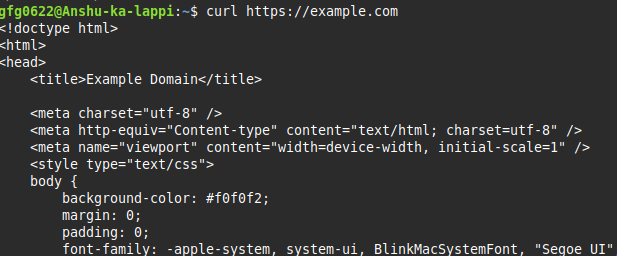
Let’s start by making the one of the most basic request in cURL that is a fetch request. Basically this command fetches the URL content and prints it in the terminal window.
curl https://example.com
Understanding request and response:-
cURL works on the same request–response model that browsers use.
The only difference is that cURL lets developers manually create the request and see the raw response directly in the terminal.
In cURL:
You send a request using a command
The server processes it
The response is printed in the terminal
Request–Response Flow in cURL
Developer writes a cURL command
cURL sends the request to the server
Server processes the request
Server sends a response
cURL prints the response in the terminal.
Using cURL to talk to APIs:-
we use cURL to make request to the server .This way we can easily talk to the server and get the raw output int he terminal. We use some flags that help us define the request that we want to make to the server.
-x : we use this flag to specify the HTTP method (Post,Put,Patch,Get,Delete).
-i : this flag is used for including response header.
-d : this flag is used when we want send some data to the server.
-H : this flag is used when you want to send headers.
Response Status (Result of the Request):-
The status code indicates whether the request was successful or not.
It is a numeric value sent by the server that summarizes the outcome of the request.
Common Status Codes
200 OK
The request was successful and the server returned data.201 Created
The request was successful and a new resource was created.400 Bad Request
The request was invalid or incorrectly formatted.401 Unauthorized
The request requires authentication.403 Forbidden
The user is authenticated but does not have permission.404 Not Found
The requested resource does not exist.500 Internal Server Error
The server failed to process the request.
Data Returned (Response Body):-
The data returned is the actual content sent back by the server.
This data is usually present in the response body and may include:
JSON data (most common for APIs)
HTML content (for websites)
Plain text messages
Error details
JSON Response:-
{ "id": 101,
"username" : "Parth",
"role" : "user"
}